#Benchmark Conclusions
These conclusions come from the benchmark results, measured with the Conway preset and Toroidal topology on the hardware described in Benchmark hardware, method, and coverage. The normalized source data is available in benchmark/benchmark-results.csv.
#Bit Packing Without Recording
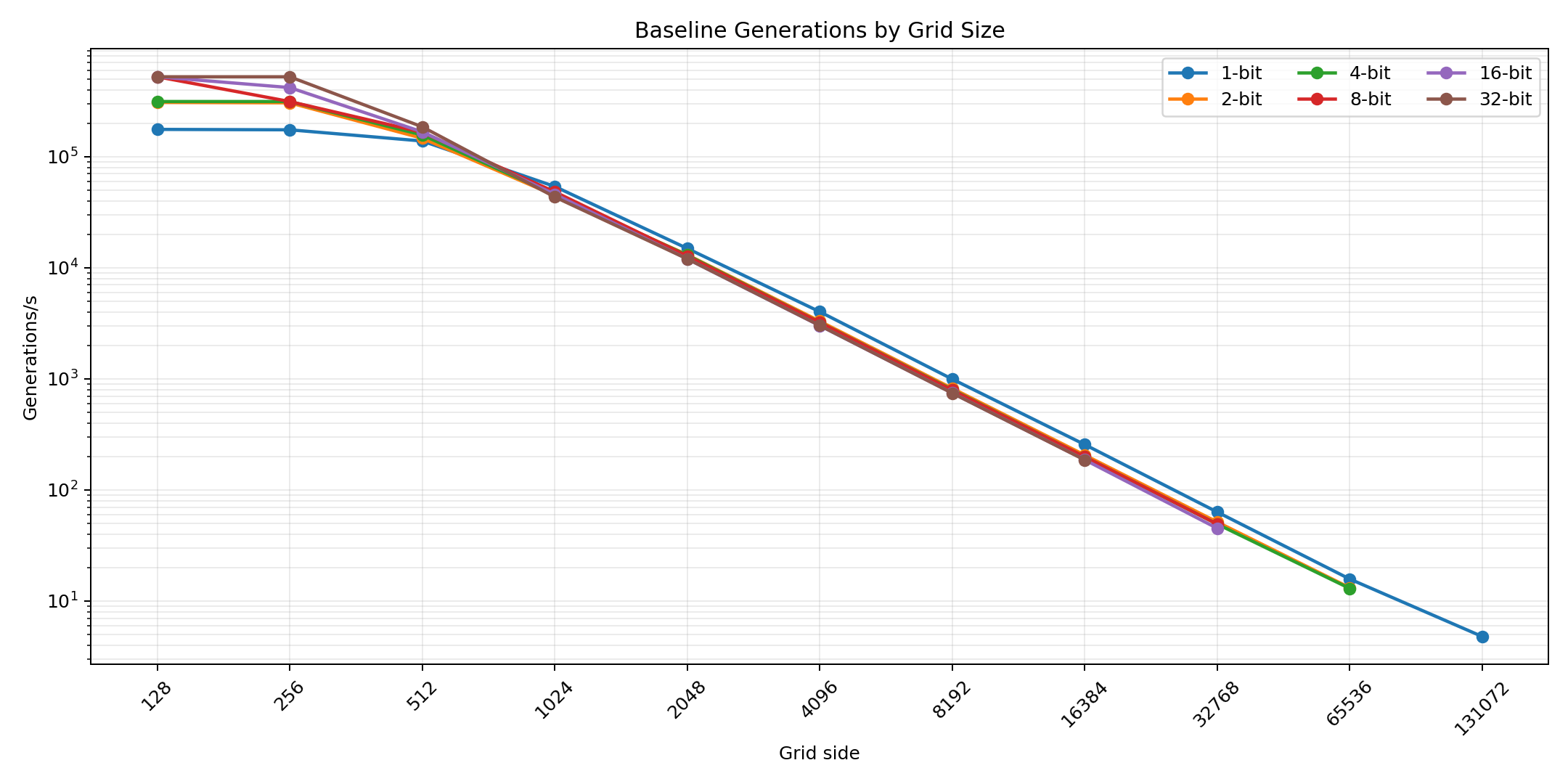
When recording is disabled, the best bit packing depends on grid size and device behavior. On the measured laptop, very small grids favor wider packings: the , , and grids reach their highest raw generation rates at wider formats, especially -bit and -bit. At these sizes, the fixed overhead of dispatching work, scheduling batches, and moving through the browser/GPU pipeline matters more than raw packed-frame size.
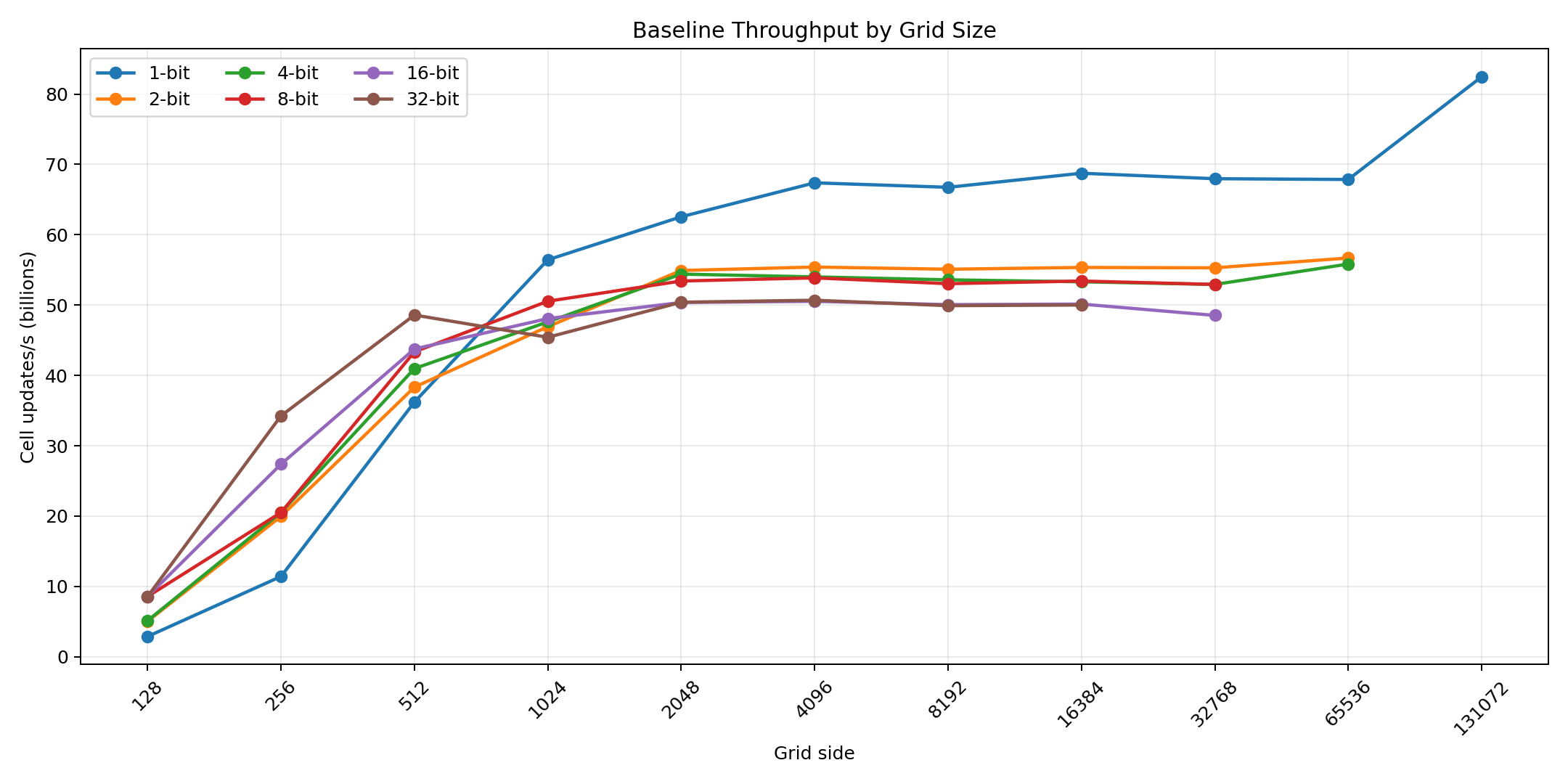
For larger grids, shorter packings become more attractive. Once the simulation is large enough for memory traffic to dominate, tighter packing reduces the amount of data each generation has to read and write. This is why the large-grid baseline throughput clusters around stronger results for -bit and lower results for wider formats.
This is device-dependent. A different GPU, driver, browser, power mode, or memory subsystem can shift the crossover point, so the best practical advice is to test the grid sizes and tribe counts you actually plan to use.
#Bit Packing While Recording
When recording is enabled, shorter bit packing is the right choice. Recording stores every captured frame, so frame size directly affects GPU copy work, readback pressure, OPFS writes, storage usage, and export size. A wider packing may support more tribes, but it also multiplies the amount of data recorded per generation.
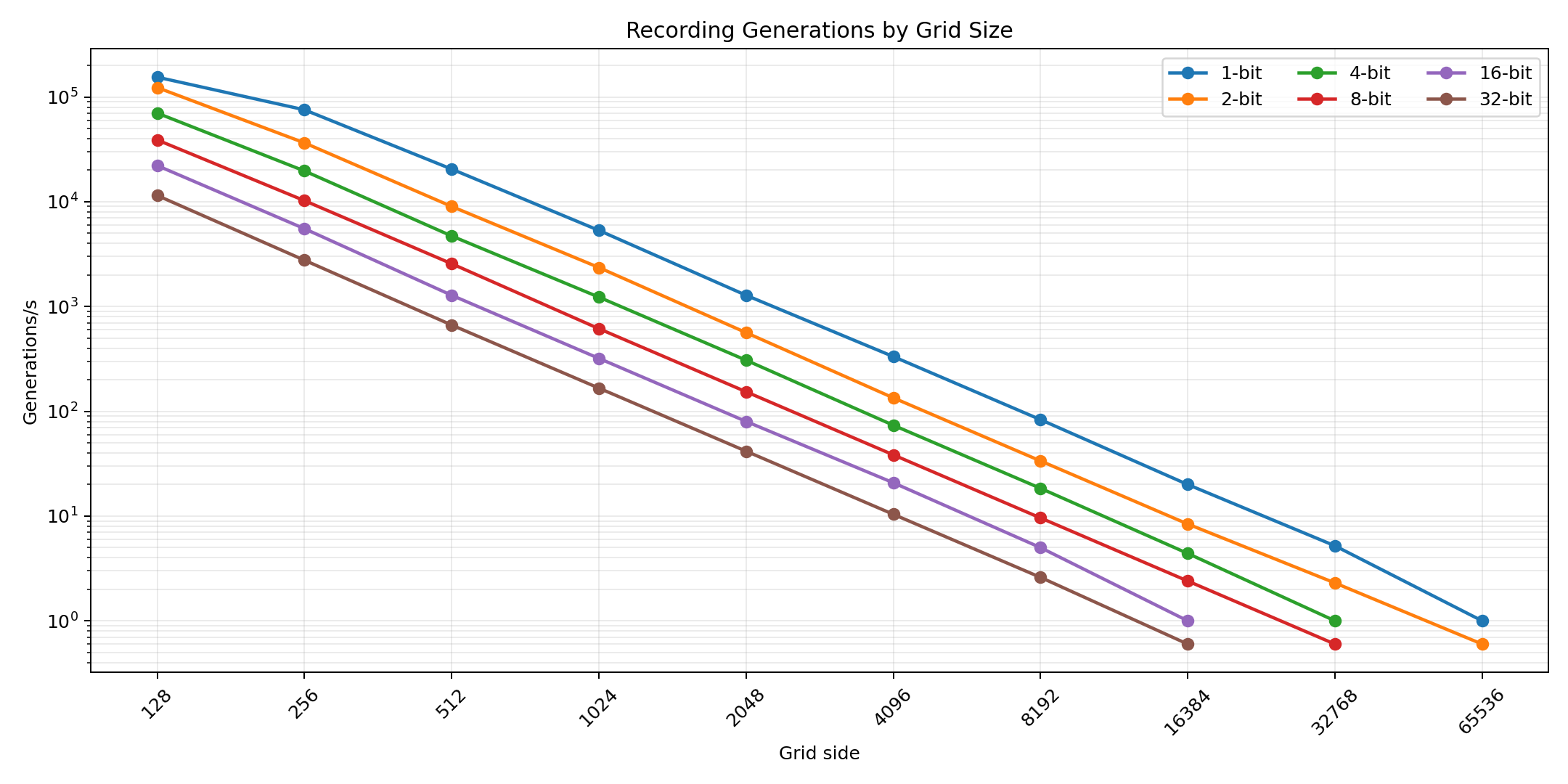
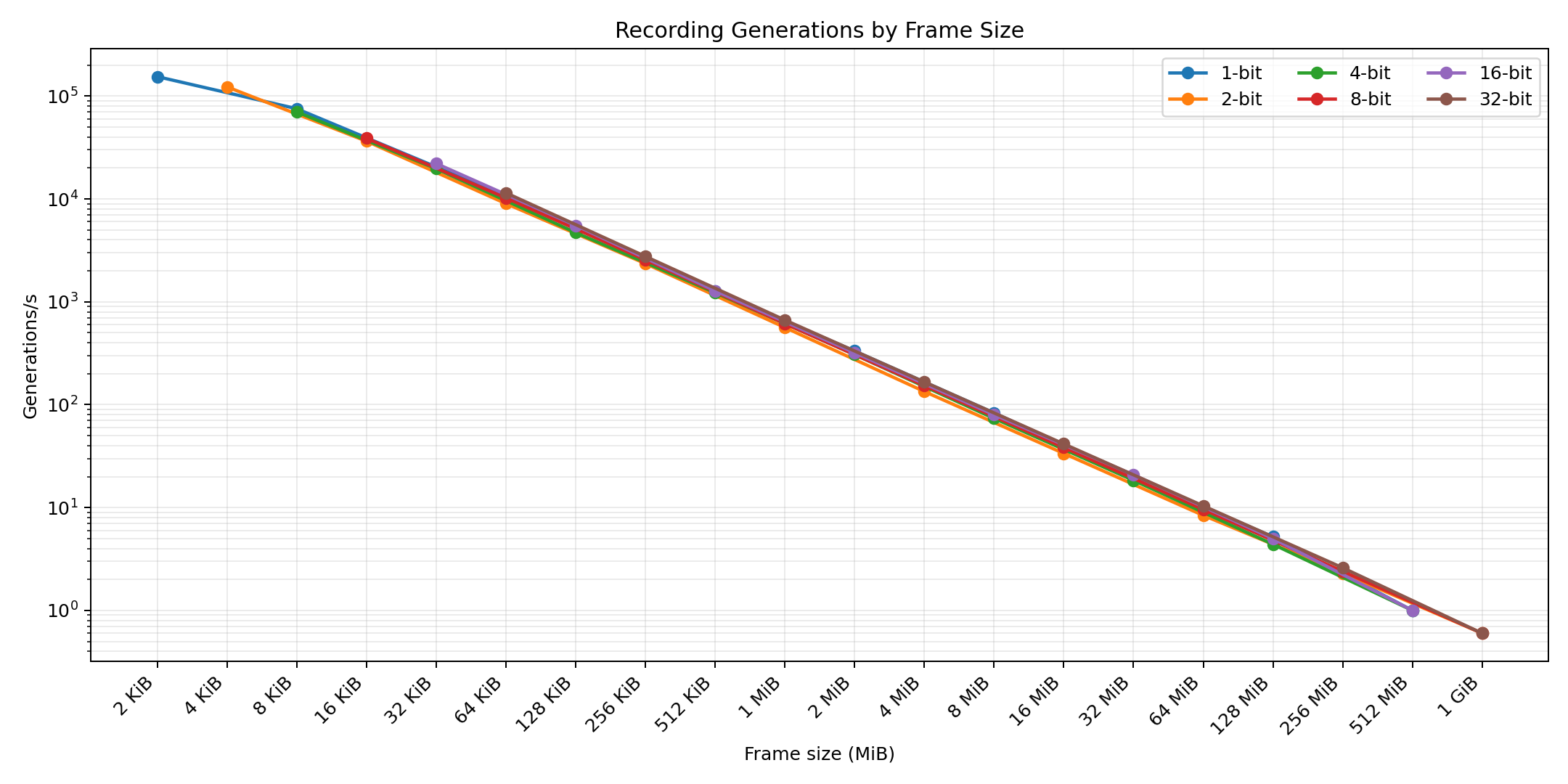
The recording tables show this clearly: as frame size grows, recorded generations per second falls quickly. Even when raw data volume stabilizes near the storage pipeline's practical throughput, larger frames still mean fewer complete generations can be captured each second.
#Grid Size And Total Work
Bigger grids do fewer generations per second because every generation updates more cells. That part is direct: doubling the side length roughly quadruples the cells per generation.
The total work per second is fairly consistent once grids are large enough. In the baseline cell-updates plot, many large-grid rows settle into broad plateaus around tens of billions of cell updates per second. It is not perfectly constant, and the exact value changes by bit packing, device behavior, and outlier runs, but the general pattern is real: large grids trade generation cadence for more work per generation.
Very small grids are different. They are mostly overhead-limited, so their cell-updates-per-second numbers are much lower even though their raw generations per second can be extremely high.
#Snapshots Versus Recording
If you only need a starting point that can reproduce a run, a snapshot is usually better than recording. A snapshot stores one state; recording stores every captured generation. That makes snapshots cheaper in storage, faster to save, and easier to keep around.
If you are unsure whether you will need the whole history, save a snapshot before the run. Grid evolution is deterministic for the same state, preset, rules, random seed, and settings, so you can load the snapshot later and record the run from that point if it turns out the history matters.
Recording is the right tool when you need backward stepping, frame export, video export, or metrics export over a range of generations. It is not the cheapest way to save a restart point.
#Max Speed Versus Fixed Target Speeds
This benchmark uses max speed. Max speed is not just a high target speed: it can reach higher throughput than fixed target speeds because rendering is disabled and the engine does not need to keep the simulation interactive. That lets the worker focus on advancing generations and adapt batch sizes around GPU queue drain time.
#Recording Backpressure
Every recording run hit backpressure. That means the recording results should be read as backpressured recording throughput, not as unconstrained simulation speed with recording enabled.
When backpressure is active, the bottleneck is no longer just shader compute. The GPU still performs simulation and copy work, but throughput also depends heavily on readback, CPU-side data movement, OPFS write scheduling, compression pressure, and storage speed. So it is fair to say recording backpressure depends more on CPU/storage/browser I/O behavior than ordinary non-recording simulation does, while still involving the GPU pipeline.
#Recording Data Volume
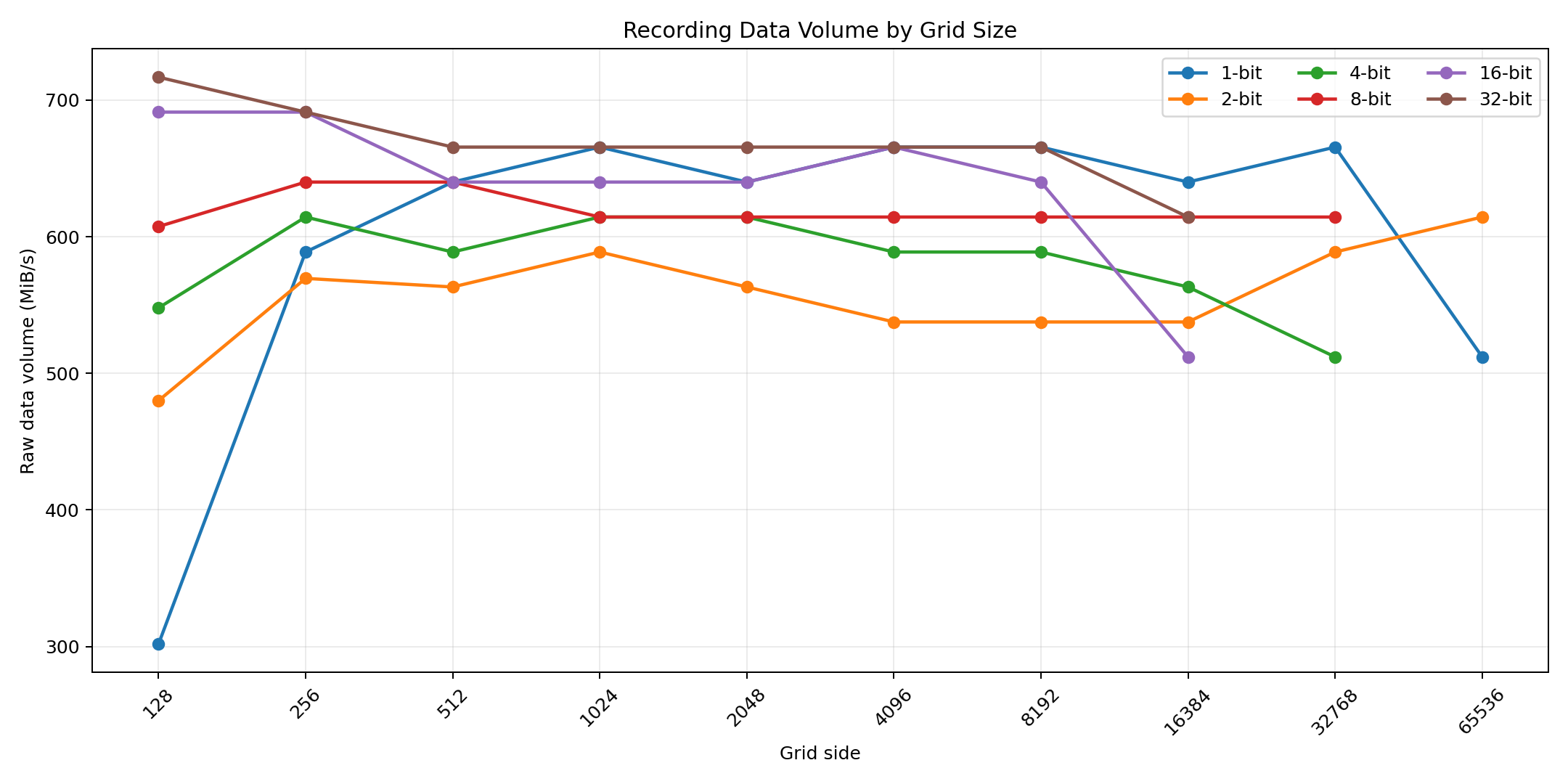
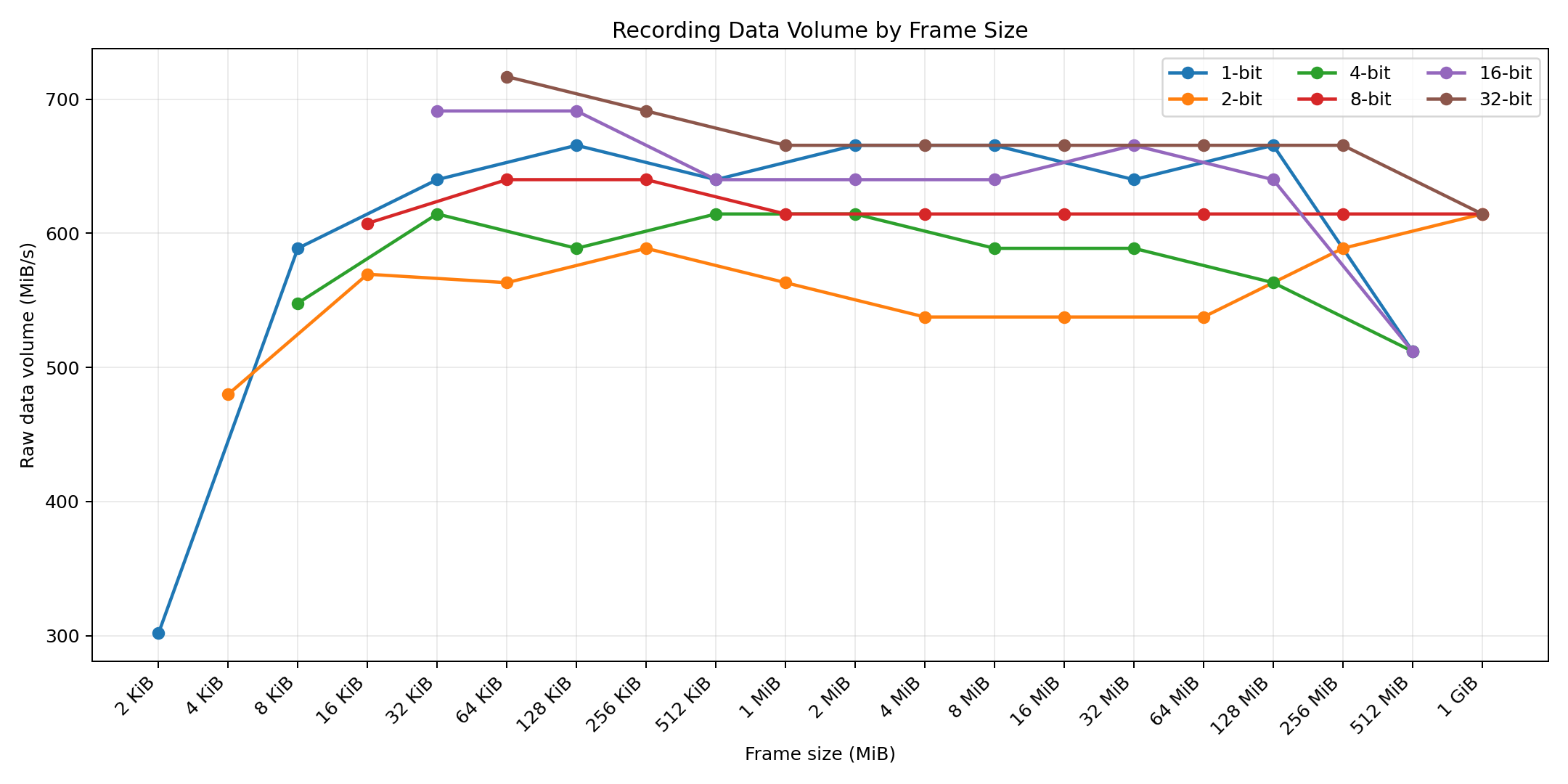
The grid at -bit packing is a useful example of the difference between generation rate and data volume. It records a very high number of generations per second, but each frame is only , so the total recorded byte volume stays much lower than the later plateau. This does not mean recording is slow for that row; it means the frame is too small to keep the recording pipeline busy in byte-throughput terms.
Recording data volume becomes much flatter once frames are large enough. The -bit and -bit recording rows are especially stable across much of the tested range: generation rate falls as frame size grows, but the product of the two stays close to the same byte volume. Those rows are also byte- and word-aligned formats, which helps making them more stable.
The visible dip around appears at different grid sizes for -bit, -bit, and -bit packing because those combinations all produce the same packed frame size. The likely cause is the interaction between recording chunks and OPFS backpressure. Recording prefers chunks up to ; once a single frame is larger than that, each generation becomes its own chunk. At , one chunk also consumes the raw pending OPFS write budget, which leaves little room to overlap recording the next chunk while the previous one is being persisted. Larger frames are still backpressured, but they perform fewer chunk/write handoffs per , so their byte volume can recover.
The final -bit point is a real dip, but not a unique -bit slowdown. All tested recording frames converge to the same data volume, which indicates a write-speed limit at that frame size. The plateau remains higher than the plateau because larger frames perform fewer chunk/write handoffs per .