#Shortcuts
#Purpose
The Shortcuts section lists keyboard and pointer controls, available for desktop-mode only. Most keyboard shortcuts are ignored while a text input, select, or textarea owns focus, and many are blocked while a GPU error, rebuild, or backpressure overlay is active.
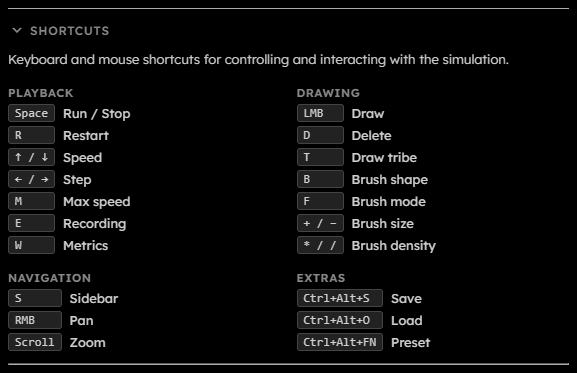
#Playback Shortcuts
| Shortcut |
Action |
Space |
Run/Stop the simulation. During a step operation, Space cancels stepping. |
R |
Restart the simulation. |
↑ / ↓ |
Increase or decrease fixed target speed. Down clamps at 1 gen/s. |
← / → |
Step backward or forward by 1 generation. |
M |
Toggle max speed. |
E |
Toggle recording when recording is available. |
W |
Toggle live metrics globally. |
#Drawing Shortcuts
| Shortcut |
Action |
Left Mouse Button |
Draw with the current selected tribes or erase in delete mode. |
D |
Toggle delete mode. |
T |
Cycle draw tribes. |
+ / - |
Increase or decrease brush size. |
* / / |
Increase or decrease brush density. |
B |
Cycle brush shapes. |
F |
Cycle brush fill modes. |
#Snapshot And Preset Shortcuts
| Shortcut |
Action |
Ctrl+Alt+S |
Save a snapshot when saving is available. |
Ctrl+Alt+O |
Open the file picker to load a snapshot when loading is available. |
Ctrl+Alt+F1 through F12 |
Apply built-in Nth preset, where N is the function-key number from 1 through 12. |
#Navigation Shortcuts
| Shortcut |
Action |
S |
Open or close the sidebar. |
Right Mouse Button |
Pan the view. |
Scroll |
Zoom in or out around the pointer. |
Touch in Pan mode |
One-finger touch pans instead of drawing. |
| Two-finger touch |
Pinch zoom. |
